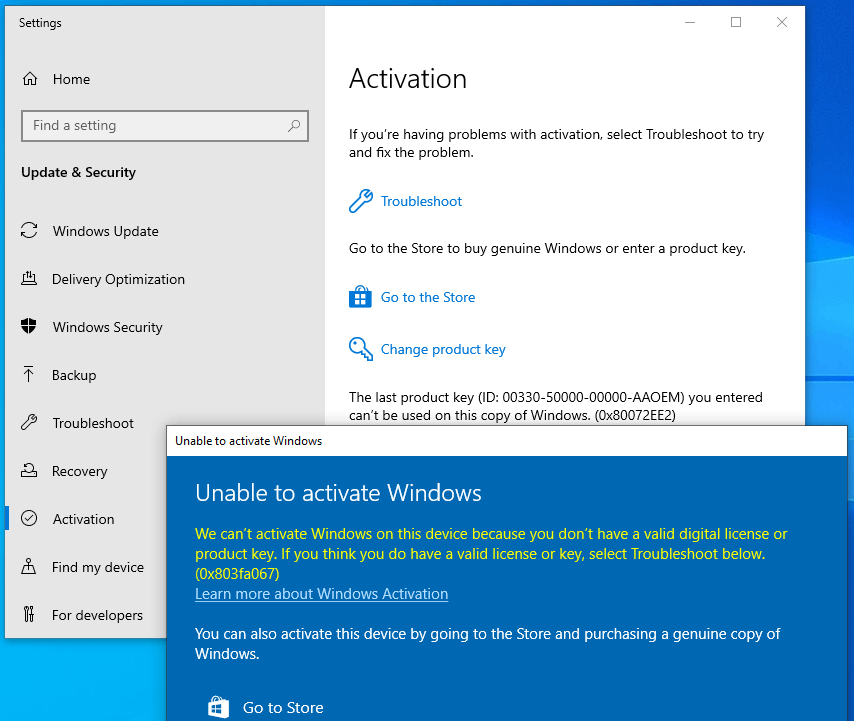
This error often occurs when you try to upgrade Windows 10 Home to Professional or your Home version has already been activated/linked with a digital license.
Option 1: Upgrade via console
Please start the command line with administration rights: Please click on Start or the Windows icon (alternatively you can also press the Windows key on the keyboard) in the taskbar, enter CMD, right-click on "Command Prompt" and select "Run as administrator". The command line/console should now open with elevated administrator rights.
Enter the following command to check which editions you can upgrade to:
DISM /Online /Get-TargetEditions
with
DISM /Online /Get-CurrentEdition
you can check which version you have currently installed.
To upgrade to a higher version, e.g. from Home to Pro, please enter the following:
changepk.exe /produckey VK7JG-NPHTM-C97JM-9MPGT-3V66T
The upgrade process will now start, please wait until the process is complete. However, you cannot activate Windows 10 Pro with this key, only upgrade from Home to Pro. After a successful upgrade, you can now activate your Professional version with the product key you purchased from us.
Additional generic keys for other Windows editions that can be upgraded to (Windows automatically recognizes which edition is behind the key based on the product code):
Windows 10/11 Home: YTMG3-N6DKC-DKB77-7M9GH-8HVX7
Windows 10/11 Home N: 4CPRK-NM3K3-X6XXQ-RXX86-WXCHW
Windows 10/11 Pro: VK7JG-NPHTM-C97JM-9MPGT-3V66T
Windows 10/11 Pro N: 2B87N-8KFHP-DKV6R-Y2C8J-PKCKT
Windows 10/11 Pro for Workstations DXG7C-N36C4-C4HTG-X4T3X-2YV77
Windows 10/11 Pro N for Workstations WYPNQ-8C467-V2W6J-TX4WX-WT2RQ
Windows 10/11 S (only up to Windows 10 1803) 3NF4D-GF9GY-63VKH-QRC3V-7QW8P
More:
- Windows Team (PPIPro) = XKCNC-J26Q9-KFHD2-FKTHY-KD72Y
- Windows Cloud (cloudedition) = KY7PN-VR6RX-83W6Y-6DDYQ-T6R4W
- Windows Cloud N (cloudeditionn) = K9VKN-3BGWV-Y624W-MCRMQ-BHDCD
- IoT Enterprise: = MNMRC-69F8V-2FCXX-GFQVY-BXQ3X
- IoT Enterprise S: = JH8W6-VMNWP-6QBDM-PBP4B-J9FX9
- CloudE = KD69N-VWMRK-Y9KBG-FCBM3-KF7QX
- Andromeda= C9PDN-TR2KB-MR4DF-3RQ7Y-88HFF
- ProfessionalEducation= 8PTT6-RNW4C-6V7J2-C2D3X-MHBPB
- ProfessionalEducationN= GJTYN-HDMQY-FRR76-HVGC7-QPF8P
- ProfessionalStudent= V3NH2-P462J-VT4G4-XD8DD-B973P
- Education=YNMGQ-8RYV3-4PGQ3-C8XTP-7CFBY
- EducationN=84NGF-MHBT6-FXBX8-QWJK7-DRR8H
- Enterprise= XGVPP-NMH47-7TTHJ-W3FW7-8HV2C
- EnterpriseS= NK96Y-D9CD8-W44CQ-R8YTK-DYJWX
- EnterpriseSEval= JBGN9-T2MH3-2YV7W-WBWHM-FGFCG
- EnterpriseN= WGGHN-J84D6-QYCPR-T7PJ7-X766F
- EnterpriseSNEval= 7M88N-MTVMR-VC46G-4K4R6-KTQF7
- Insider Keys Server vNext (LTSC)
- Server Standard: MFY9F-XBN2F-TYFMP-CCV49-RMYVH
- Data center: 2KNJJ-33Y9H-2GXGX-KMQWH-G6H67
- Insider Keys Server
- Server Standard: V6N4W-86M3X-J77X3-JF6XW-D9PRV
- Server Datacenter: B69WH-PRNHK-BXVK3-P9XF7-XD84W
Option 2: Upgrade via generic key
Attention: The upgrade is apparently not possible with every OEM key. If Windows complains that a product key is not suitable, the following will help: Microsoft has published a generic product key that can be used to upgrade a Home edition to a Pro edition as described.
VK7JG-NPHTM-C97JM-9MPGT-3V66T
If Windows issues an error here, e.g. the error code 0x803fa067, please repeat the process and briefly disconnect the Internet connection, e.g. by removing the LAN cable, deactivating the LAN adapter or by deactivating the WLAN, and enter the code again.
However, you cannot activate Windows Pro with this key, only upgrade from Home to Pro. After a successful upgrade, you can now activate your Professional version with the product key you purchased from us.
Option 3: Offline activation
- Disconnect your Internet connection. Remove the network cable or deactivate the Wi-Fi.
- Press the WIN+R keys and enter "SLUI" in the text field, the activation wizard should open. Enter the upgrade key here and/or the Windows 10 Pro product key that you received from us.
- Done. Windows 10/11 Pro should now be active.
Was this article helpful?
That’s Great!
Thank you for your feedback
Sorry! We couldn't be helpful
Thank you for your feedback
Feedback sent
We appreciate your effort and will try to fix the article